Category

Security Reviews

Compliance Record

When Clients Say “You Never Told Us”: The MSP Problem Nobody Talks About

By Security Reviews

Every MSP owner has experienced some variation of the same conversation.

A client suffers a cyberattack. A cyber insurance questionnaire arrives. A new point of contact joins the business and starts reviewing previous security decisions. Suddenly, questions are being asked about security recommendations that were made months or even years earlier.

“Did you ever recommend multi-factor authentication?”

“Why weren’t we told to implement email security?”

“We don’t remember discussing this.”

In many cases, the recommendation was made. The real challenge is proving it.

The Search Nobody Wants to Start

When these situations arise, most MSPs begin the same frustrating process.

Someone searches through Outlook for old emails. Another person looks through the PSA for tickets or notes. Previous Word documents, PowerPoint presentations and PDF reports are opened one by one, hoping to find evidence that the recommendation was communicated.

Hours can disappear trying to rebuild a timeline that should have been available in seconds.

Even when the information is eventually found, it may be spread across multiple systems with no clear record of exactly what was delivered, who received it or whether the client acknowledged it.

We Experienced This First-Hand

Before I exited my previous MSP, this wasn’t a rare occurrence.

Whenever a client experienced a security incident or questioned why a particular security control hadn’t been implemented, the first task wasn’t solving the problem. It was proving what had already been recommended.

We knew the conversations had taken place.

We knew the reports had been sent.

But finding the evidence often meant searching through years of emails, tickets, presentations and shared folders.

Sometimes it took minutes. Sometimes it took hours. Every minute spent searching was time that could have been spent supporting clients instead.

Security Reviews Are Only Half the Story

Many MSPs invest significant time creating professional IT Security Reviews.

The report is presented to the client, recommendations are discussed, and everyone moves on to the next project.

But what happens two years later?

Can you quickly demonstrate:

  • Exactly which recommendations were made?
  • When the report was delivered?
  • Who received it?
  • Whether the client acknowledged it?
  • That the recommendations were formally communicated?

For many MSPs, answering those questions still involves searching through multiple systems.

Why an Audit Trail Matters

An IT Security Review shouldn’t simply be a document.

It should become part of a permanent client record.

Having a clear audit trail doesn’t just save time. It also helps demonstrate the consistency and professionalism of your security review process.

Whether you’re responding to a client query, preparing for a cyber insurance discussion or simply reviewing previous recommendations before the next Security Review, having everything in one place provides confidence that your records are complete.

Why We Built the Compliance Record

This experience was one of the reasons we built the Compliance Record in SecuVeo.

Every Security Review creates a downloadable record containing key audit information, including report delivery, disclaimer acknowledgement, recipient details, timestamps and supporting activity history.

Rather than searching through emails, tickets and file shares, your team has a clear record of what was communicated, to whom and when.

It’s designed to help MSPs maintain consistent records while significantly reducing the time spent reconstructing previous client communications.

The Value Isn’t Just the Report

Professional IT Security Reviews help clients understand their current security posture and identify opportunities for improvement.

Just as important is having confidence that those recommendations have been properly documented.

Because when someone asks, “Did you ever tell us to implement this?”, the answer shouldn’t depend on searching years of emails and hoping you can find the right attachment.

It should already be documented.

About SecuVeo

SecuVeo helps MSPs create, deliver and track professional IT Security Reviews. With PSA integrations, Microsoft 365 Security Evidence, AI-generated Executive Summaries and a built-in Compliance Record, SecuVeo helps standardize the entire Security Review process while creating more opportunities to grow recurring security revenue.

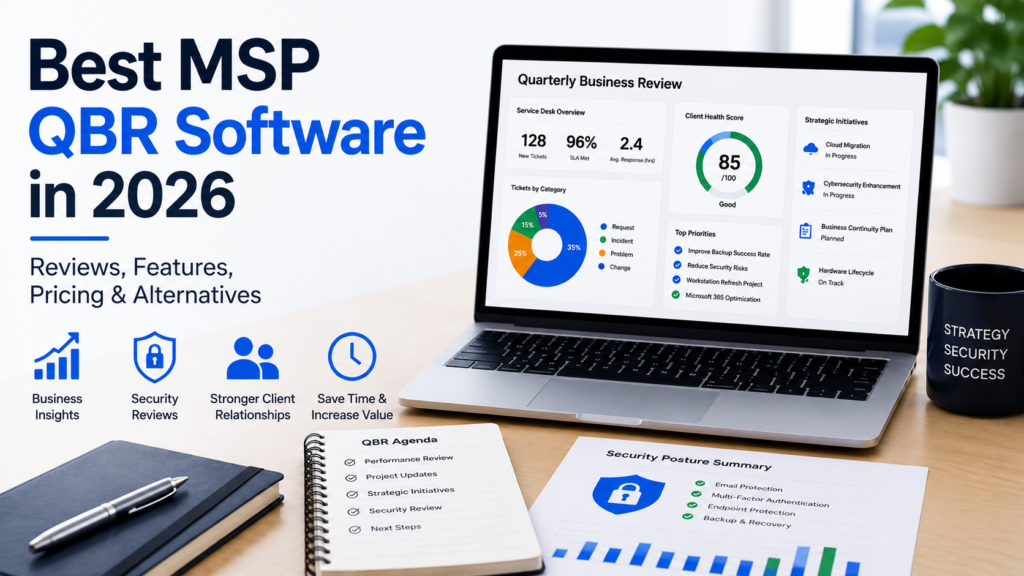
MSP Quarterly Business Review software dashboard showing business reporting and IT security review features

Best MSP QBR Software in 2026: Features, Pricing & Alternatives

By Security Reviews

Quarterly Business Reviews (QBRs) have become one of the most valuable ways for managed service providers (MSPs) to demonstrate value, strengthen client relationships, uncover new business opportunities, and ensure technology investments continue to support their clients’ business goals.

As the MSP industry has matured, so has the software available to support these meetings. Today, there are several excellent QBR platforms that help automate data collection, present business insights, and create consistent, professional client reviews.

However, over the past few years, many MSPs have started asking a different question.

Should IT security reviews really be part of a Quarterly Business Review, or do they deserve a dedicated process of their own?

Having spent many years building and running an MSP myself, I’ve found there isn’t a single right answer. It depends entirely on what you’re trying to achieve.

What Is MSP QBR Software?

MSP QBR software helps managed service providers prepare, deliver, and track Quarterly Business Reviews with their clients.

Rather than manually building presentations in PowerPoint or Word, these platforms typically gather information from PSA, RMM, documentation and other business systems to produce professional reports that help guide client conversations.

A typical Quarterly Business Review may include:

  • Service desk performance
  • Ticket trends
  • Strategic technology recommendations
  • IT projects and roadmaps
  • Hardware lifecycle planning
  • Budget discussions
  • Business objectives
  • Future technology planning

For many MSPs, these meetings are one of the best opportunities to demonstrate ongoing value while strengthening long-term client relationships.

What Should Good MSP QBR Software Include?

Every MSP works slightly differently, but the best QBR platforms generally help you:

  • Present service performance and ticket trends.
  • Review strategic technology initiatives.
  • Discuss business goals.
  • Identify project opportunities.
  • Standardize presentations across account managers.
  • Reduce preparation time.
  • Produce professional client reports.
  • Track actions from previous meetings.

Ultimately, good QBR software removes manual work while helping every client receive a consistent experience.

Popular MSP QBR Platforms

Several platforms have built strong reputations within the MSP industry.

Solutions such as Lifecycle Insights, CloudRadial, Propel Your MSP, and other established platforms each have their own strengths. Some focus on executive reporting, others specialize in client engagement, strategic planning, customer portals or technology roadmaps.

Rather than asking which platform is “best,” it’s usually more useful to consider which one best supports the way your MSP delivers client reviews.

QBR Software vs Dedicated IT Security Review Platforms

Although they often appear similar, they solve different business problems.

Feature Traditional MSP QBR Software Dedicated IT Security Review Platform
Primary Purpose Business reviews and strategic planning IT security reviews and cyber risk discussions
Executive Reporting ✔ Excellent ✔ Focused on security posture
Service Desk & KPI Reporting ✔ Yes Limited
Technology Roadmaps ✔ Yes Not typically included
Security Recommendations Usually basic or manual ✔ Core functionality
Microsoft 365 Security Evidence Rarely available ✔ Built specifically for security reviews
PSA Billing Validation Some integrations ✔ Used to automatically validate deployed services
Historical Security Comparison Limited ✔ Track improvements and new concerns between reviews
Report Delivery Tracking Varies by platform ✔ Included
Disclaimer Acknowledgment Rare ✔ Included
Compliance Audit Trail Limited ✔ Built-in
Best For Quarterly Business Reviews, account management and business planning Dedicated IT Security Reviews, cyber risk management and compliance discussions

There isn’t a right or wrong choice because these platforms solve different problems.

Many MSPs are now using both. Their QBR platform supports strategic business conversations, while a dedicated IT Security Review platform provides a structured process for discussing cybersecurity posture, documenting recommendations and maintaining an audit trail of what was presented to the client.

Understanding MSP QBR Pricing

Pricing models vary significantly across vendors.

Some platforms charge per technician or user, which can work well for smaller MSPs but becomes increasingly expensive as your team grows.

Others price based on the number of managed clients, while larger vendors may offer custom enterprise agreements.

When comparing products, remember that the subscription fee is only part of the overall investment. Time spent configuring templates, training account managers and preparing reviews should also be considered.

Where Traditional QBR Software Starts to Struggle

One trend we’ve seen over the last few years is MSPs trying to use their QBR platform for absolutely everything, including IT security reviews.

At first glance, that seems logical. Security is one of the most important topics discussed during client meetings, so why not include it in the same presentation?

The challenge is that security reviews have very different requirements.

Unlike a traditional Quarterly Business Review, an effective IT Security Review often needs to:

  • Record whether specific security controls are deployed.
  • Explain business risk in language non-technical decision-makers understand.
  • Track recommendations over time.
  • Compare improvements since the previous review.
  • Highlight new security concerns.
  • Provide evidence supporting recommendations.
  • Maintain an audit trail showing exactly when reports were delivered and acknowledged.
  • Produce documentation suitable for compliance and cyber insurance discussions.

Trying to manage all of that inside a general-purpose QBR platform often results in additional manual work using PowerPoint, Word, spreadsheets and email.

The Hidden Cost of Manual Security Reviews

Many MSPs still prepare security reviews manually.

Information is collected from multiple systems, copied into PowerPoint presentations, screenshots are added, recommendations are rewritten, PDFs are created and everything is emailed to the client.

The process works. It’s also incredibly time-consuming.

More importantly, it can be difficult to prove exactly what recommendations were made six or twelve months later if a client questions whether they were ever advised to implement a particular security control.

As cybersecurity becomes increasingly important, maintaining a clear audit trail has become just as valuable as producing the report itself.

Where SecuVeo Fits

SecuVeo isn’t designed to replace your existing QBR software.

Instead, it’s designed to solve one very specific challenge exceptionally well.

SecuVeo is a dedicated IT Security Review platform built specifically for managed service providers.

Rather than creating another PowerPoint presentation every quarter, MSPs can generate professional security reviews that business owners and decision-makers can easily understand.

The platform combines PSA billing information with Microsoft 365 Security Evidence to help populate report items automatically, while still allowing the MSP to review and approve every recommendation before the report is delivered.

Security recommendations can then be tracked over time, making it easy to demonstrate both improvements and new concerns since the previous review.

Every report also includes delivery tracking, disclaimer acknowledgment records and a permanent audit trail showing exactly what was sent, who received it and when it was acknowledged.

For many MSPs, that’s an important layer of protection that email attachments and traditional presentations simply don’t provide.

Choosing the Right Platform

There isn’t a single “best” MSP QBR software because every MSP operates differently.

If your priority is executive reporting, business planning, technology strategy and client engagement, a dedicated QBR platform is probably the right investment.

If your biggest challenge is consistently delivering professional IT Security Reviews that generate security projects, demonstrate your expertise and provide a documented history of your recommendations, then a dedicated security review platform may be a better fit.

Many successful MSPs now use both, allowing each platform to focus on what it was designed to do.

Frequently Asked Questions

What is MSP QBR software?

MSP QBR software helps managed service providers prepare and deliver Quarterly Business Reviews by bringing together operational, business and technology information into a professional client presentation.

Is IT Security Review software the same as QBR software?

No. While security is often discussed during a Quarterly Business Review, dedicated IT Security Review software focuses specifically on cybersecurity posture, recommendations, evidence, risk and compliance.

Should IT Security Reviews be separate from Quarterly Business Reviews?

Many MSPs are choosing to separate them. This allows business strategy meetings to remain focused while giving cybersecurity the dedicated attention it deserves.

Can QBR software replace PowerPoint?

Yes. Modern QBR platforms significantly reduce the amount of manual work involved in creating PowerPoint presentations. However, many MSPs still use separate tools for dedicated IT Security Reviews.

Final Thoughts

Client expectations continue to rise.

Business leaders increasingly expect clear advice, measurable outcomes and straightforward explanations of cyber risk.

The software you choose should make those conversations easier, not more complicated.

Whether you continue using a traditional QBR platform, introduce dedicated IT Security Reviews or combine both approaches, the goal remains the same: helping clients make informed decisions while demonstrating the value your MSP delivers.

As cybersecurity becomes a larger part of every client relationship, having a structured, repeatable way to communicate security recommendations may soon become just as important as the technology itself.

Looking for a Better Way to Deliver IT Security Reviews?

SecuVeo helps MSPs create professional, business-friendly IT Security Reviews that clients actually understand.

By combining PSA billing information with Microsoft 365 Security Evidence, SecuVeo helps reduce manual effort while giving your team the flexibility to review every recommendation before it’s presented to the client.

With historical comparisons, delivery tracking, disclaimer acknowledgments and a complete audit trail built in, SecuVeo makes it easier to standardize security reviews, demonstrate value and generate new security opportunities.

Start your free trial today and discover how dedicated IT Security Reviews can complement your existing QBR process.


MSP Security Reviews

Why MSPs Should Stop Using PowerPoint for IT Security Reviews

By Security Reviews

For years, PowerPoint has been the go-to tool for creating client security reviews.

It’s familiar, flexible, and almost everyone knows how to use it. Many managed service providers have invested countless hours building presentation templates that explain security recommendations, highlight technology gaps, and support conversations with clients.

The problem isn’t PowerPoint itself.

It’s that the way MSPs deliver cybersecurity advice has changed.

Business owners now expect more than a collection of slides. Cyber insurance requirements are becoming stricter, compliance obligations continue to grow, and clients increasingly want clear evidence to support every recommendation they’re asked to invest in.

As a result, many service providers are beginning to move away from presentation software and toward platforms designed specifically for ongoing security reporting.

Why PowerPoint Became So Popular

There was a time when PowerPoint solved almost every reporting challenge an MSP faced.

It allowed account managers to create professional-looking presentations without investing in specialist software, and every review could be customized for each client.

A typical process looked something like this.

An engineer gathered screenshots from Microsoft 365, backup platforms, endpoint security tools and firewalls. Someone copied the information into PowerPoint, updated recommendations, exported the presentation as a PDF and emailed it to the client before the meeting.

For many years, that workflow was perfectly reasonable.

Today’s security conversations are different.

Clients now expect ongoing visibility into their security posture rather than simply receiving another presentation every quarter.

The Hidden Cost of Manual Reporting

Most MSP owners underestimate how much time goes into producing every client security assessment.

The process often includes:

  • Gathering information from multiple systems.
  • Reviewing Microsoft 365 security settings.
  • Checking PSA billing records.
  • Taking screenshots.
  • Updating presentation slides.
  • Rewriting recommendations.
  • Exporting PDFs.
  • Emailing reports.
  • Recording that the review has been completed.

Multiply those tasks across dozens or hundreds of clients, and the administrative effort becomes significant.

Even worse, much of the work is repeated every single quarter.

Every Security Review Starts Over

One of the biggest drawbacks of PowerPoint is that every new report often feels like starting from scratch.

Account managers regularly find themselves asking:

  • What changed since our last meeting?
  • Which recommendations have already been made?
  • Which risks have been addressed?
  • Are there any new security concerns?
  • Which projects have been completed?

Answering those questions usually means opening previous presentations and manually comparing slides.

It’s possible.

It’s simply not an efficient way to work.

PowerPoint Doesn’t Create a Reliable Audit Trail

There’s another challenge that doesn’t receive enough attention.

Imagine a client suffers a ransomware attack and later asks:

“Did you ever recommend enabling Multi-Factor Authentication?”

With PowerPoint, the answer often depends on whether someone can locate the correct presentation, confirm which version was sent and prove the client actually received it.

That’s not always straightforward.

Purpose-built security review platforms maintain a documented history showing:

  • When each report was created.
  • Who received it.
  • When it was delivered.
  • When the disclaimer was acknowledged.
  • Which recommendations were included.
  • How the client’s cybersecurity posture has changed over time.

That level of documentation protects both the MSP and the client.

Clients Expect Evidence, Not Just Recommendations

Modern business leaders want to understand why they’re being asked to invest in additional security.

Instead of accepting statements such as:

“We recommend Conditional Access.”

They’re far more likely to ask:

“What evidence supports that recommendation?”

This is where modern cybersecurity reporting has evolved.

Instead of relying solely on screenshots and written observations, many platforms now include evidence gathered directly from Microsoft 365 alongside professional recommendations.

Examples include:

  • Multi-Factor Authentication status.
  • Conditional Access configuration.
  • Device compliance.
  • Administrative role assignments.
  • Security policy settings.
  • Organizational security configuration.

Presenting evidence alongside recommendations helps clients make informed decisions and creates far more productive security conversations.

Automation Doesn’t Replace Expertise

Some providers worry that automation removes flexibility.

In reality, it should do exactly the opposite.

Good security review software automates repetitive administration while allowing the MSP to review, edit and approve every recommendation before it’s presented to the client.

Technology prepares the report.

The MSP provides the expertise.

That balance is exactly how it should be.

PowerPoint Was Never Built for Security Reviews

PowerPoint is an excellent presentation tool.

It simply wasn’t designed to:

  • Track recommendations over time.
  • Compare previous reviews.
  • Maintain compliance records.
  • Record client acknowledgments.
  • Validate deployed security services.
  • Retrieve Microsoft 365 security evidence.
  • Produce standardized security scores.
  • Maintain historical reporting.

As cybersecurity has become a larger part of every client relationship, these capabilities have become increasingly important.

How Many MSPs Are Working Today

Rather than trying to squeeze everything into a Quarterly Business Review, many providers now separate business discussions from cybersecurity conversations.

Their QBR focuses on:

  • Business performance.
  • Service delivery.
  • Technology planning.
  • Budget discussions.
  • Strategic initiatives.

Their security review focuses on:

  • Cybersecurity posture.
  • Security recommendations.
  • Microsoft 365 security configuration.
  • Risk reduction.
  • Compliance readiness.
  • Progress since the previous assessment.

The result is a clearer, more focused meeting for everyone involved.

Where SecuVeo Fits

SecuVeo isn’t trying to replace your existing QBR software.

It’s designed specifically for creating professional IT security reviews.

Instead of manually building PowerPoint presentations every quarter, SecuVeo combines PSA billing information with Microsoft 365 Security Evidence to help populate report items automatically while allowing every recommendation to be reviewed before the report is delivered.

Historical comparisons make it easy to demonstrate improvements over time, while delivery tracking, disclaimer acknowledgments and a permanent audit trail provide a documented record of every client interaction.

The outcome isn’t simply a better report.

It’s a more consistent, scalable and professional process for delivering cybersecurity advice.

Is It Time to Move Beyond PowerPoint?

PowerPoint still has its place.

If your MSP only produces occasional security reports, it may continue to meet your needs.

However, if your team delivers security assessments across dozens or hundreds of managed clients every quarter, the amount of manual administration quickly becomes difficult to justify.

Purpose-built security review software allows account managers to spend less time formatting slides and more time helping clients improve their security.

Frequently Asked Questions

Can PowerPoint still be used for IT security reviews?

Yes. Many MSPs continue to use PowerPoint, particularly when creating occasional reports. However, as review volumes increase, many providers find dedicated software offers greater consistency and efficiency.

Why are MSPs moving away from PowerPoint?

Manual reporting takes time, makes historical comparisons difficult and rarely provides a complete audit trail. Dedicated platforms automate much of the preparation while improving consistency.

What’s the difference between a QBR and a security review?

A Quarterly Business Review focuses on business performance, technology planning and service delivery. A security review focuses specifically on cybersecurity posture, risk, recommendations and compliance.

Does automation replace the account manager?

No. Automation prepares information and gathers evidence. The MSP remains responsible for reviewing the findings and delivering professional recommendations to the client.

Final Thoughts

PowerPoint has been an important part of the MSP industry for many years.

But client expectations have changed.

Today’s organizations expect structured cybersecurity reporting, measurable progress and clear evidence that supports every recommendation.

Dedicated security review platforms help MSPs meet those expectations while reducing repetitive administration and creating a permanent record of every review delivered.

For many providers, the move away from PowerPoint isn’t really about changing presentation software.

It’s about adopting a better process.

Turn Security Reviews Into Monthly Recurring Revenue

How MSP Security Reviews Create Recurring Revenue Opportunities

By Security Reviews

Many MSPs think of Security Reviews as something they have to deliver.

They’re part of the service agreement, expected by the client, or required as part of an ongoing cybersecurity service. The review is completed, the meeting takes place, and everyone moves on until the next one is due.

That approach meets the requirement.

It also misses one of the biggest opportunities an MSP has to strengthen client relationships and grow recurring revenue.

The most successful MSPs don’t view Security Reviews as reports.

They view them as strategic planning sessions that help clients continuously improve their security posture.

Great Security Reviews Focus on What Happens Next

A Security Review shouldn’t simply describe the current state of a client’s environment.

Its purpose is to help the client decide what should happen next.

Many reviews spend pages documenting technical findings, configuration issues, and observations. While the information may be accurate, it often leaves business owners asking the same question:

“Where do we start?”

The best Security Reviews answer that question.

Rather than presenting a long list of disconnected recommendations, they prioritize the actions that will have the greatest impact on reducing risk.

Clients leave with a clear understanding of:

  • What should be addressed immediately.
  • What can be scheduled for later.
  • Why each recommendation matters.
  • How each improvement supports their business objectives.

That’s where Security Reviews begin creating real value.

Clients Invest in Outcomes, Not Technology

Most business owners don’t buy cybersecurity solutions because they’re interested in technical features.

They invest because they want to reduce risk.

They want to protect their business, satisfy cyber insurance requirements, improve resilience, and avoid costly downtime.

When recommendations are presented in terms of business outcomes rather than technical configurations, conversations become much easier.

Instead of discussing individual security settings, the conversation shifts to reducing business risk.

That makes decisions simpler for clients and creates greater confidence in the recommendations being made.

Prioritization Creates Momentum

Another common mistake is trying to solve everything at once.

A report containing twenty recommendations may appear comprehensive, but it often overwhelms the client.

Most organizations have limited budgets, limited resources, and competing priorities.

When everything appears equally important, nothing feels urgent.

A much better approach is to establish clear priorities.

Clients should understand:

  • Which recommendations should be completed first.
  • Which improvements can be planned over the coming months.
  • How each completed project improves their overall security posture.

Small, measurable improvements create momentum.

Momentum keeps Security Reviews relevant throughout the year rather than only during quarterly meetings.

Recurring Revenue Should Be the Outcome—Not the Goal

Professional Security Reviews naturally uncover opportunities for additional services.

That doesn’t mean they should become sales presentations.

Clients quickly recognize when recommendations exist simply to generate revenue.

Trust disappears.

Instead, every recommendation should be supported by genuine business risk and clear evidence.

When clients understand both the problem and the value of solving it, additional projects become a logical next step rather than a sales pitch.

That’s an important distinction.

The revenue comes from helping clients improve—not from trying to sell more services.

Build a Long-Term Security Roadmap

The most valuable Security Reviews don’t exist in isolation.

Each review builds on the previous one.

Clients can see:

  • What recommendations were completed.
  • What risks remain.
  • What has improved.
  • What should happen next.

Over time, this creates a structured security roadmap that evolves alongside the client’s business.

For the client, that’s reassuring.

For the MSP, it creates a continuous cycle of meaningful conversations, measurable improvements, and opportunities to deliver additional value.

Security Reviews Strengthen Client Relationships

The best MSPs understand that Security Reviews are about far more than reporting.

They create structure.

They build accountability.

They demonstrate progress.

Most importantly, they help clients make informed decisions about their security investments.

When Security Reviews consistently help clients reduce risk and achieve their business goals, stronger relationships naturally follow.

Recurring revenue is often the result—but it should never be the objective.

The objective is becoming the trusted advisor that clients rely on to guide their security strategy year after year.

Security review guide

The MSP’s Guide to Security Review Accountability

By Security Reviews

Every MSP has experienced a conversation that starts with good intentions but quickly becomes uncomfortable.

A security incident occurs. A cyber insurance questionnaire arrives. An audit uncovers a missing security control. Suddenly the client asks a simple question:

“Were we ever told about this?”

The MSP is convinced the recommendation was discussed. The client isn’t so sure.

Unfortunately, proving what happened months ago isn’t always straightforward.

This is why accountability has become one of the most important aspects of delivering professional Security Reviews.

Security Reviews Are More Than Reports

Most MSPs invest a considerable amount of time preparing Security Reviews.

They gather information from multiple systems, assess security controls, prioritize recommendations, and meet with clients to discuss the findings. At the time, everything feels well organized.

Fast forward six months and the situation often looks very different.

The original Account Manager may have changed roles. Engineers have moved on. Clients have forgotten previous conversations. Recommendations have been buried in email threads or attached to meeting notes that nobody has opened since.

The problem usually isn’t that recommendations weren’t made.

The problem is that there is no structured record showing what happened next.

Accountability Creates Clarity

A mature Security Review process should answer simple but important questions.

  • Was the Security Review delivered?
  • Did the client receive it?
  • Was the disclaimer acknowledged?
  • What recommendations were made?
  • Which recommendations have been completed?
  • Which risks still remain?

Having clear answers benefits everyone.

For the client, it creates visibility into their security journey.

For the MSP, it creates consistency across every customer relationship.

Rather than relying on memory, both parties are working from the same documented history.

Security Is a Continuous Process

One of the biggest mistakes MSPs make is treating Security Reviews as isolated events.

A report is created, discussed, and then forgotten until the next review.

The best Security Reviews don’t start from scratch every quarter.

They build on previous conversations.

Clients should be able to see:

  • What was recommended previously.
  • What has been completed.
  • What has improved.
  • Which risks remain outstanding.
  • What new recommendations have been identified.

This transforms Security Reviews into an ongoing improvement program instead of a series of disconnected meetings.

Accountability Builds Trust

Some MSPs think accountability is primarily about protecting themselves if a dispute arises.

While a documented audit trail can certainly help resolve misunderstandings, that’s only part of the story.

The real benefit is trust.

Clients appreciate transparency.

When recommendations are documented, acknowledged, revisited, and measured over time, they gain confidence that their security is being managed consistently rather than reactively.

Business owners can also demonstrate progress to insurers, auditors, board members, and other stakeholders who increasingly expect evidence of active cybersecurity management.

Better Accountability Leads to Better Decisions

There is also a practical commercial benefit.

Clients are far more likely to approve security improvements when they can clearly see the history behind them.

Instead of asking, “Why do we need this now?”, the conversation becomes:

“This recommendation was identified six months ago, remains unresolved today, and continues to represent one of your highest security risks.”

That context makes security decisions much easier.

Modern Security Reviews Should Create an Audit Trail

As cybersecurity continues to evolve, clients expect more than technical expertise.

They expect structure.

They expect consistency.

They expect evidence.

A modern Security Review should provide a complete history of recommendations, client acknowledgements, completed improvements, and outstanding risks.

That creates accountability for both the MSP and the client while ensuring Security Reviews remain valuable long after the meeting has ended.

Ultimately, accountability isn’t about protecting either party.

It’s about giving everyone confidence that security recommendations are documented, understood, and acted upon over time.

That’s what transforms a Security Review from a report into a trusted business process.

Security reviews fail

Why Most MSP Security Reviews Fall Short (And What Great Looks Like)

By Security Reviews

Most Managed Service Providers understand the importance of regular Security Reviews. They create an opportunity to discuss cyber risks, demonstrate value, recommend improvements, and strengthen client relationships. Yet despite the time invested preparing reports and holding review meetings, many Security Reviews never deliver the impact they should.

The problem isn’t that MSPs aren’t conducting reviews. Most established providers already perform quarterly business reviews, technology reviews, or dedicated Security Reviews. The issue is that too many reviews become one-off events rather than part of an ongoing security strategy.

A report is created, recommendations are discussed, actions are agreed, and then everyone moves on. Three or six months later, the process starts again, often with little reference to the previous conversation. Clients struggle to remember what was recommended, account managers start from scratch, and opportunities to demonstrate progress are lost.

Inconsistency Creates an Inconsistent Client Experience

One of the biggest challenges for growing MSPs is consistency.

Every Account Manager has their own style. Some focus heavily on cybersecurity strategy, while others spend most of the meeting discussing support performance, projects, or operational issues. Neither approach is necessarily wrong, but it often means clients receive completely different experiences depending on who conducts the review.

As an MSP grows, this inconsistency becomes harder to manage.

Leadership may assume every client receives the same level of service, only to discover that recommendations are documented differently, risks are explained differently, and follow-up actions vary from one account manager to another. Some clients receive detailed guidance and clear next steps, while others receive little more than a conversation about what happened over the last quarter.

The issue is rarely a lack of effort.

More often, it’s the absence of a structured and repeatable Security Review process.

Too Much Technical Detail, Not Enough Business Value

Another common mistake is overwhelming clients with technical information.

Engineers naturally think in terms of Conditional Access policies, MFA settings, device compliance, phishing protection, or backup configurations. Business owners don’t.

What clients really want to understand is:

  • How secure are we today?
  • What has improved since our last review?
  • What are our biggest risks?
  • What should we fix first?
  • Why does it matter to our business?

A Security Review should answer those questions clearly.

When reports focus on business risk instead of technical complexity, conversations become more engaging, recommendations become easier to understand, and clients are more confident making investment decisions.

Great Security Reviews Show Progress

The biggest difference between average Security Reviews and exceptional ones is continuity.

A great review doesn’t start from a blank page every quarter.

Instead, it builds on previous discussions.

Clients can immediately see:

  • What recommendations were made previously.
  • Which actions have been completed.
  • What has improved.
  • What new risks have appeared.
  • What still requires attention.

Instead of feeling like isolated meetings, Security Reviews become part of a long-term improvement plan.

This changes the conversation completely.

Rather than asking, “What’s wrong today?”, clients begin asking, “How much further have we improved?”

That’s exactly where every MSP wants the discussion to be.

Evidence Builds Trust

Clients are far more likely to act when recommendations are supported by evidence.

Instead of relying on opinion, modern Security Reviews should demonstrate why a recommendation has been made using objective data wherever possible.

For example:

  • Microsoft 365 Security Evidence
  • Security configuration results
  • PSA Billing Evidence
  • Historical comparisons
  • Previous recommendations
  • Documented client acknowledgements

Evidence gives clients confidence that recommendations are based on facts rather than assumptions.

It also protects the MSP by creating a clear record of what was recommended and when.

Security Reviews Should Drive Better Decisions

The purpose of a Security Review isn’t simply to produce another report.

The report supports the conversation.

The real objective is to help clients understand risk, prioritise improvements, and make informed security decisions over time.

When Security Reviews become structured, consistent, and evidence-backed, they stop being administrative exercises and become one of the most valuable services an MSP can provide.

As cybersecurity continues to become a board-level priority, the MSPs that deliver professional Security Reviews consistently will stand apart from competitors still relying on spreadsheets, PowerPoint presentations, or inconsistent review processes.

The best Security Reviews don’t simply identify problems.

They demonstrate progress, build trust, and help clients make better security decisions year after year.