
Security Reviews That Help MSPs
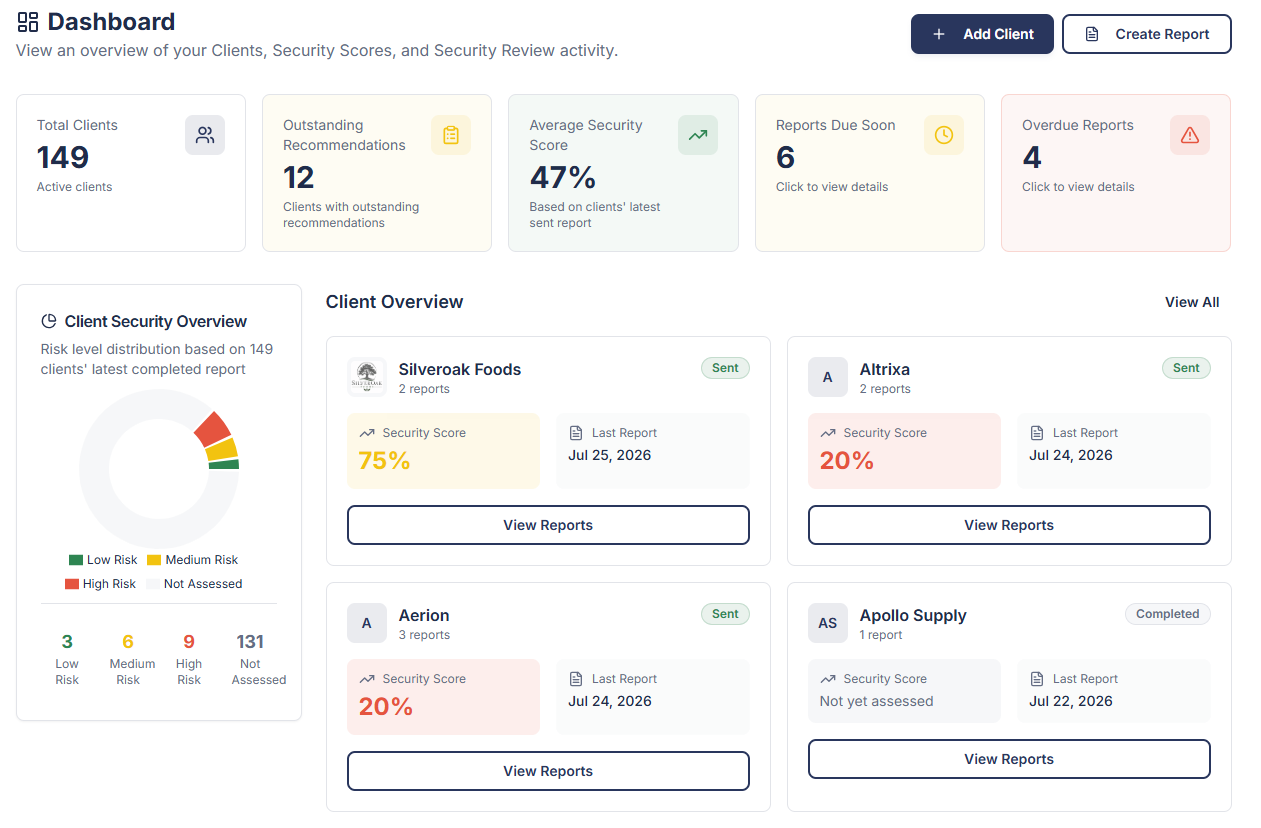
Standardize Security Reviews across every client, clearly communicate security risks, accelerate client approvals, and protect your MSP.
- Turn Security Reviews into a fast, repeatable process
- Deliver professional reports your clients actually understand
- Demonstrate your value and strengthen client relationships
- Protect your MSP with disclaimer acknowledgments
- Grow project and recurring revenue
Native ConnectWise PSA, HaloPSA, and Microsoft 365 integrations reduce manual preparation, helping you deliver Security Reviews faster.
0:00
0:00
Why This Tool
Built from MSP Experience
SecuVeo was founded by the former owner of a successful London-based MSP, built and grown over 15 years before being acquired. It was created to solve the real-world challenges of delivering consistent, professional Security Reviews.
Drawing on that experience, SecuVeo helps MSPs standardize Security Reviews, communicate security risks in plain English, demonstrate value, and help clients confidently approve recommended security improvements.
Demonstrate Value
Deliver consistent, professional Security Reviews that clearly communicate security risks while demonstrating the value of your services.
Save Time
Automate Security Reviews with native PSA integration, Microsoft 365 Security Evidence, AI-generated summaries, and historical comparisons to dramatically reduce manual effort.
Reduce Risk
Maintain a complete audit trail of Security Reviews, report delivery, disclaimer acceptance and client decisions to help protect your MSP.
Grow Revenue
Turn every Security Review into an opportunity to discuss security improvements, strengthen client relationships and generate more revenue.
30-Day Free Trial
Experience the full SecuVeo platform with no credit card required. Create and send up to 2 client security review reports during your trial.
Features
Built for Better Security Reviews
Everything your Account Managers and vCIOs need to deliver clear Security Reviews, get improvements approved, and grow project and recurring revenue.
Native PSA Integration
Connect to ConnectWise PSA or HaloPSA. Import client details and match PSA billing items to security controls to reduce manual preparation.
Professional Branded Reports
Create branded reports with clear Security Scores, AI-generated Executive Summaries, and Changes Since Last Review so clients understand their progress and priorities.
Microsoft 365 Security Evidence
Bring Microsoft 365 security settings and control results into your reviews to support findings and recommendations.
Framework Alignment
Structure your Security Reviews around NIST CSF 2.0 or Cyber Essentials, with relevant framework references included in client reports.
Complete Audit Trail
Track report delivery, record disclaimer acknowledgment before clients access reports, and maintain a clear review history.
Opportunities and Sales Tracking
Create PSA opportunities and tickets directly from Security Reviews, then track the one-time and recurring sales won.
Simple Process
How It Works
From security evidence to client conversations and sales won. Give your Account Managers and vCIOs a repeatable way to review security, explain the gaps, and get improvements approved.

1. Create Your Security Review
Choose a client and a reusable template built around your services. Keyword matching connects PSA billing items to security controls, while Microsoft 365 brings in security evidence. Your team checks the findings and recommends improvements.
2. Generate Your Branded Report
Turn your findings into a professional report with clear Security Scores, tailored recommendations, and AI-generated summaries. Show clients what’s protected, where the gaps are, and what’s changed since their last review.


3. Send It To Your Client
Personalize the email and send it from the assigned Account Manager’s Microsoft 365 mailbox or your dedicated sending subdomain. Clients receive a secure report link and, when configured, a link to book a meeting.
4. Track Delivery and Acknowledgment
Clients acknowledge your disclaimer before accessing their report. Track email delivery, disclaimer acknowledgment, and client activity, with a clear record of what was shared and when.


5. Turn Recommendations into Revenue
Create PSA opportunities and tickets directly from the review to move recommendations forward. Track the one-time and recurring sales won so you can see the revenue your Security Reviews generate.
Simple Pricing
One Platform.
Every Feature Included.
Simple pricing based on the number of managed clients. No per-user fees. No per-report fees.
Starter
For MSPs getting started with structured Security Reviews.
$149/ month
Up to 50 clients
Unlimited reports & users
Growth
For growing MSPs managing a broader client base.
$249/ month
Up to 150 clients
Unlimited reports & users
Scale
For large MSPs standardizing Security Reviews at scale.
$399/ month
Up to 300 clients
Unlimited reports & users
Prices exclude applicable taxes.
Enterprise Solution
Manage more than 300 clients?
Contact us for a tailored Enterprise plan with custom pricing, dedicated onboarding and priority support.
Starter
For MSPs getting started with structured Security Reviews.
$1,430/ year
Effective $119/mo billed annually
Up to 50 clients
Unlimited reports & users
Growth
For growing MSPs managing a broader client base.
$2,390/ year
Effective $199/mo billed annually
Up to 150 clients
Unlimited reports & users
Scale
For large MSPs standardizing Security Reviews at scale.
$3,830/ year
Effective $319/mo billed annually
Up to 300 clients
Unlimited reports & users
Every Plan Includes
Unlimited Security Review reports
Unlimited users with role-based access
Fully customizable Security Review templates
Professional PDF reports with your branding
Native ConnectWise PSA and HaloPSA integrations
PSA Billing Evidence
Automatic keyword matching between PSA billing items and security controls
Microsoft 365 Security Evidence
Framework alignment with NIST CSF 2.0 and Cyber Essentials
AI-generated Executive Summaries & Changes Since Last Review
Security Scores with progress tracking over time
Create PSA opportunities and track one-time and recurring sales won
Report emails sent from Account Manager mailboxes or your own sending subdomain
Email delivery tracking and disclaimer acknowledgments
Automated Security Review reminders
HaloPSA Self Service Portal integration
Complete report history and audit trail
Downloadable Report Compliance Records
Microsoft Single Sign-On (SSO)
Multi-Factor Authentication (MFA)
Free one-on-one onboarding call
Have Questions?
Frequently Asked Questions
Everything you need to know about SecuVeo and how it can help your MSP.
Why was SecuVeo built?
SecuVeo was created by the former owner of a successful London-based MSP after experiencing first-hand how manual, inconsistent and overly technical security reviews had become, often resulting in lengthy reports that clients simply didn’t understand. It was built to help MSPs standardize the security review process, communicate risks more clearly, demonstrate the value of their services, and make it easier for clients to approve recommended security improvements.
Why separate Security Reviews from QBRs?
QBRs are great for reviewing your overall service relationship, but cybersecurity deserves its own conversation.
Dedicated IT Security Reviews help clients understand their security risks, approve more recommendations, and create more recurring security revenue for your MSP.
Is SecuVeo a vulnerability scanner?
SecuVeo isn’t a vulnerability scanner. It’s a security review platform built exclusively for MSPs. It helps Account Managers and vCIOs deliver consistent, professional security reviews, communicate security risks in plain English, track recommendations over time, and turn recommended security improvements into approved projects and recurring revenue.
Can I try SecuVeo before purchasing?
Yes. Every new MSP account includes a 30-day free trial with full platform access. During your trial, you can create and send up to 2 client security review reports before deciding whether to subscribe.
Do I need a credit card to start my free trial?
No. You can start your 30-day free trial without providing any payment details.
What counts as a client?
Each company or organization recorded within SecuVeo counts as one client, regardless of the number of users or Security Reviews created. Hidden clients and clients scheduled for deletion do not count towards your plan’s client limit.
Are reports really unlimited?
Yes. All paid plans include unlimited security review reports. The only difference between plans is the maximum number of clients stored.
Are there any per-user fees?
No. Every subscription includes unlimited internal MSP users at no additional cost.
Do my clients need a SecuVeo account?
No. SecuVeo is designed exclusively for MSPs as a fully white-labelled platform. Clients receive branded security review reports by email and do not require access to SecuVeo.
Do you integrate with PSA tools?
Yes. SecuVeo currently integrates with ConnectWise PSA and HaloPSA. Autotask PSA integration is planned for 2027.
Do you integrate with Microsoft 365?
Yes. SecuVeo securely connects to your Clients’ Microsoft 365 tenants using Microsoft Graph and Microsoft 365 Exchange Online & Purview. Both integrations are strictly read-only and retrieve Microsoft 365 Security Evidence to help validate key security controls and automatically suggest deployment statuses within your Security Reviews.
SecuVeo never makes changes to users, devices, policies, settings, or licenses within your Clients’ Microsoft 365 environments.
Can I align Security Reviews with NIST or Cyber Essentials?
Yes. Framework Alignment lets you align Product Library controls in your Security Reviews with NIST CSF 2.0 or Cyber Essentials. Relevant framework references automatically appear in your Security Review and client report. Framework Alignment shows how reviewed controls relate to these frameworks and is not a compliance assessment or certification.
Can I import my existing clients?
Yes. If you use ConnectWise PSA or HaloPSA, your clients and contacts can be synced automatically. Alternatively, you can quickly import clients and contacts using our spreadsheet import feature, making it easy to get started regardless of your PSA.
Can I customize and automate Security Reviews?
Yes. Create bespoke Security Review templates that reflect your MSP’s services and sales approach. Templates can include complete security packages, individual security solutions, or a combination of both.
Configure PSA Billing and Microsoft 365 Security Evidence matching rules to automatically suggest report statuses, helping standardize the Security Review process, reduce manual effort, and ensure consistency across your team.
How long does it take to complete a security review?
Most client information is automatically populated from your PSA and your clients’ Microsoft 365 environment, significantly reducing manual effort. Once configured, creating a professional Security Review typically takes just a few minutes.
Can I change plans later?
Yes. You can upgrade or downgrade your subscription at any time. If your client count exceeds your current plan, you’ll simply be moved to the appropriate tier.
What happens if I exceed my client limit?
You’ll be notified when you reach your client limit and be upgraded automatically to the next subscription tier. Your existing data and reports remain unaffected.
Is there a minimum contract term?
Start with a free 30-day trial, with no credit card required. Once you select a paid plan, your subscription begins on a rolling 12-month agreement, with the option to pay monthly or annually in advance. Annual billing includes a 20% saving.
Your plan adjusts as your active client count changes, with prorated billing and no restart of your 12-month subscription term. You can also switch between monthly and annual billing at your next contractual renewal.
View our full Terms of Service.
What platform security is in place?
SecuVeo is built with security at its core. All data is encrypted in transit and at rest using industry-standard encryption. Multi-factor authentication (MFA) is enforced for all users, with role-based access controls and strict tenant isolation to protect MSP data. SecuVeo is hosted on Amazon Web Services (AWS) infrastructure in the United States and protected by continuous security monitoring, secure backups, and disaster recovery capabilities. The platform also undergoes independent penetration tests by Cobalt. For more information about how we protect your data, please see our Security Statement.
Who owns my data and reports?
You retain full ownership of all your data and reports. SecuVeo never claims ownership of your content, and you can export your reports at any time.
Ready to Increase Security Revenue?
Start your free 30-day trial and discover how SecuVeo helps MSPs standardize security reviews, demonstrate value, and grow recurring security revenue.
Start your free 30-day trial today. No credit card required.
Your Free Trial Includes
- 30-day free trial
- Full access to the SecuVeo platform
- Create and send up to 2 client security review reports
- No credit card required
